Sign In | Join Free | My infospaceinc.com
China Shenzhen Xinxiantong Technology Co., Ltd. logo
Shenzhen Xinxiantong Technology Co., Ltd.
我们致力于通过持续为全球客户提供创新的产品、可靠的质量和长期的合作价值,成为显示技术领域值得信赖的全球合作伙伴。
Verified Supplier

1 Years

Home > HDMI LCD Display >

5 Inch HDMI LCD Display CTP IPS TFT LCD Display 800x480 For Raspberry Pi

Shenzhen Xinxiantong Technology Co., Ltd.
Trust Seal
Verified Supplier
Credit Check
Supplier Assessment
Contact Now

5 Inch HDMI LCD Display CTP IPS TFT LCD Display 800x480 For Raspberry Pi

  • 1
  • 2
  • 3

Outline : 118.5×84.7×5.2 mm

MOQ : 100

Signal Interface : LVDS

Lumens Degrees : 1000cd/m²

Interface : RGB, SPI, MIPI, LVDS, or Parallel

Model Number : YQ84-5

Price : $22.5-25.5/pieces

Display Mode : Normally White, Transmissive

View Direction : free/all

Place of Origin : Guangdong, China

Controller Ic : SSD1316

Storage Temperature : -30℃~80℃

Lcm Dimension : 34.60(H) X 47.80(V) X 1.90(T)

Response Time : 6ms

Display Color : Monochrome Black and White

Operating_Temperature : -20°C to 70°C

Packaging Details : 54*143*38(mm)/180g

Supply Ability : 50K/Month

Delivery Time : 30-45days

Name : HDMI LCD Display

Brand Name : XXT

Color Gamut : 72 % of NTSC(Typ.)

Drive System : a-Si TFT active matrix

Payment Terms : T/T

Viewing Area : 116.2mm×87.1mm

Contact Now

XXT 5 Inch 800x480 HDMI LCD Display CTP IPS TFT LCD Display For Raspberry Pi
Detail Information
Place of Origin
China
Brand Name
XXT
Certification
CE/ROHS
Model Number
YQ84-5
Type:
HDMI Display
Display Size:
5 Inch
Supplier Type:
Factory
Video Input:
HDMI
Highlight:

800x480 HDMI LCD Display

,

Raspberry Pi 5 Inch Touch Screen

,

IPS TFT LCD Display 5 Inch

Product Description
XXT 5 Inch 800x480 HDMI Display CTP IPS TFT Touch Screen for Raspberry Pi
Product Description
  • 5" standard display with 800x480 resolution (supports maximum HDMI resolution of 1920x1080)
  • Capacitive touch screen supporting 5-point touch
  • Built-in OSD menu adjustment (Contrast/Brightness/Saturation, etc.)
  • Compatible with Raspberry Pi, BB Black, Banana Pi and other mini PCs
  • Works as general-purpose HDMI display for computers, TV boxes, Xbox360, PS4, Nintendo Switch
  • Supports Raspbian, Ubuntu, Kodi, Win10 IOT (single-touch, free drive)
  • Functions as PC monitor supporting Win7/8/10 (5-point touch, XP and older: single-point)
  • HDMI audio output supported
  • CE and RoHS certified
Product Parameters
Size 5.0 inch
SKU MPI5001
Resolution 800 × 480 dots
Touch 5 point capacitive touch
Audio output Supported
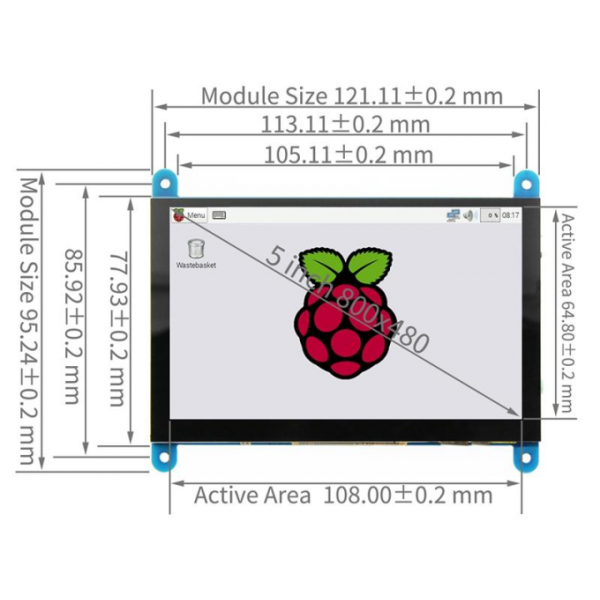
Active Area 108.00 × 64.80 mm
Dimensions 121.11 × 95.24 mm
Weight 259 g (package included)
Product Size
5 Inch HDMI LCD Display CTP IPS TFT LCD Display 800x480 For Raspberry Pi
Hardware Description
5 Inch HDMI LCD Display CTP IPS TFT LCD Display 800x480 For Raspberry Pi
Earphone: 3.5mm Audio output interface
&Touch: USB connector (For power supply and touch output, the functions of the both
are the same, can just use one of them)
Display: HDMI interface (For connecting motherboard and LCD monitor)
Power: Controls the backlight turned on and off to save power
Return: Return (Only valid in the OSD Settings menu)
Right/Down: Direction Right/Down(Backlight shortcut key)
Left/Up: Direction Left/Up(Backlight shortcut key)
Menu: Open the OSD / Select key (Only valid in the OSD Settings menu)
How to use with Raspberry Pi OS
Step 1: Install Raspberry Pi OS image
  1. Download the latest image from the official download
  2. Install the system according to the official tutorial steps
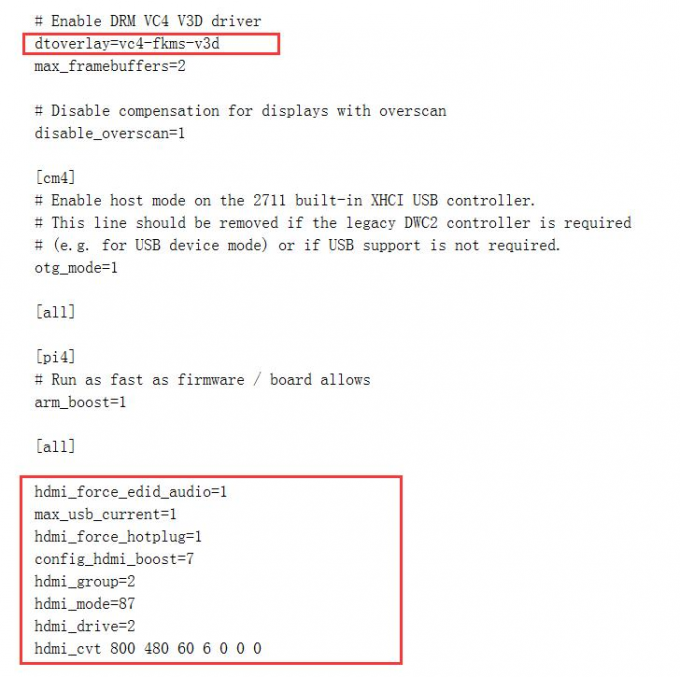
Step 2: Modify the "config.txt"
  1. After programming, open "config.txt" in Micro SD Card root directory
  2. Change dtoverlay=vc4-kms-v3d to dtoverlay=vc4-fkms-v3d
  3. Add the following code at the end of "config.txt":
    max_usb_current=1
    hdmi_force_hotplug=1
    config_hdmi_boost=7
    hdmi_group=2
    hdmi_mode=1
    hdmi_mode=87
    hdmi_drive=2
    hdmi_cvt 800 480 60 6 0 0 0
5 Inch HDMI LCD Display CTP IPS TFT LCD Display 800x480 For Raspberry Pi
Step 3: Connect the hardware
  • Insert Micro SD Card to Raspberry Pi
  • Connect Raspberry Pi and LCD with HDMI cable
  • Connect USB cable between Raspberry Pi and LCD
  • Power on Raspberry Pi
How to rotate display direction
If driver is not installed:
sudo rm -rf LCD-show
git clone https://github.com/goodtft/LCD-show.git
chmod -R 755 LCD-show
cd LCD-show/
sudo ./MPI5001-show
If driver is already installed:
cd LCD-show/
sudo ./rotate.sh 90
(Replace '90' with 0, 90, 180 or 270 for different rotation angles)
How to use as PC monitor
  • Connect computer HDMI output to LCD HDMI interface
  • Connect LCD's USB Touch interface to device USB port
  • For testing, use LCD as the only monitor (disconnect other monitors)

Product Tags:

5 Inch HDMI LCD Display


CTP IPS TFT LCD Display


IPS TFT LCD Display 800x480

      
Quality 5 Inch HDMI LCD Display CTP IPS TFT LCD Display 800x480 For Raspberry Pi for sale

5 Inch HDMI LCD Display CTP IPS TFT LCD Display 800x480 For Raspberry Pi Images

Inquiry Cart 0
Send your message to this supplier
 
*From:
*To: Shenzhen Xinxiantong Technology Co., Ltd.
*Subject:
*Message:
Characters Remaining: (0/3000)